
Technical Bulletin [2026] B-114: Carmanah School Zone Calendar Software - Time Zone Update (BC/AB/MB)
Carmanah’s technical bulletins are intended to provide updates, clarification, and guidance on the installation and maintenance of our products. They convey relevant product information to our partners and customers. Please contact us if you have any questions about the content of this bulletin.
Originally posted 11/2/2026.
Product Applicability
This bulletin applies to the following MX Series products:
- Legacy: R829 and R829C
- E Series: R829-E
- F Series: R829-F
- G Series: R829-G
Starting November 1st, 2026, The following provinces in Canada have moved to permanent daylight savings time:
- British Columbia (PCT)
- Alberta (ABT)
- Manitoba (MBT)
For school zone systems that are scheduled using the R829 School Zone Calendar PC Software, you may require updating the PC you program your school zone beacons with.
If your beacon system is not flashing at the correct time (off by one hour), follow the procedure below.
Procedure
- Ensure your PC is on the correct time zone.
- Open the software and connect to the beacon:
- Configure —> Communications —> Select COM Port.
- Click Communicate —> Send Time.
|
|
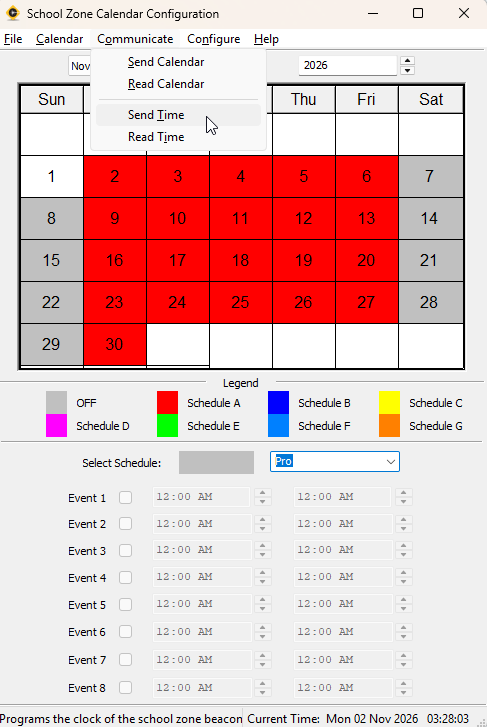
If the beacons are not coming on at the correct time after sending the updated time, build and send a new calendar to the system.