
What is the low voltage disconnect(LVD) threshold for my Gen 3 system?
Product Applicability
The following products are discussed in this article:
- E Series: R920-E, R820-E, R829-E and R247-E
- F Series: R920-F, R820-F, R829-F and R247-F
- G Series: SC315-G, R820-G, R829-G and R247-G
- SpeedCheck: SPEEDCHECK-12, SPEEDCHECK-15 and SPEEDCHECK-18
- Wrong-Way Driver: WW100, WW200 and WW400
What is Low Voltage Disconnect (LVD)
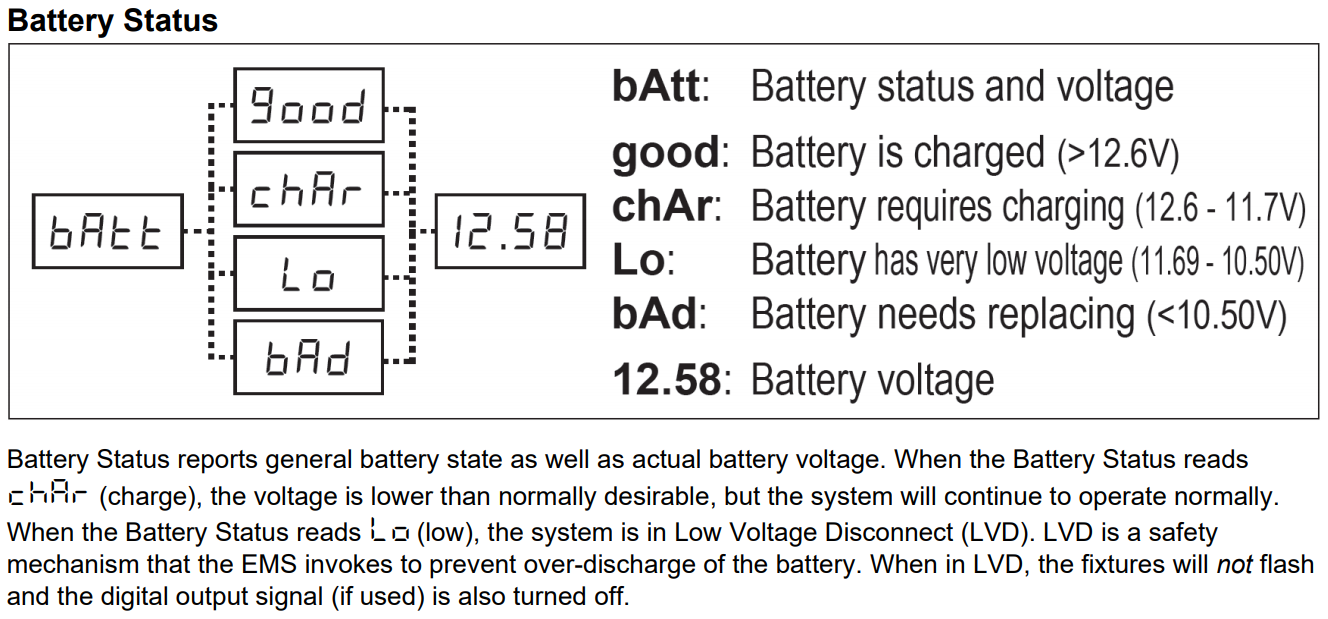
Low Voltage Disconnect (LVD) automatically disconnects the beacons and flashers when battery voltage falls below 11.7V, protecting the battery from deep discharge damage.
How the system acts under LVD
- The beacons go off - Beacons and flashers on that controller stop flashing.
When the battery gets to 11.7V for too long, the system turns off the beacons on that controller so the battery can recover.
The beacons come back on by themselves once the battery has charged up to 12.0V DC.
-
On solar systems, the battery has to be charging, not just reading a higher voltage. A battery can look charged in the morning, but the beacons stay off until the sun is charging it again.
Find out why the battery is low
- Solar systems: Check that the solar panel is connected correctly and clean. Make sure buildings, trees, or debris aren’t shading it. Panels need daylight to charge the battery. Then check the panel itself show no visible defects (cracks, corrosion, delamination).
- Check the battery’s age and condition. Old batteries don’t hold a charge well. If the system reports the battery as “bad,” it needs replacing.
- Check for loose or corroded connections. A loose connection can make the battery read low even when the battery is fine.
- AC systems: Check the power supply, breakers, and fuses.
What the alerts mean
Gen 3 systems (E, F, and G Series) status screen legend
Related Articles
How does temperature affect batteries?
My system battery status shows as battery "bad," what should I do?
How long should my battery last?
What battery chemistries are available?
What battery sizes are available?
What do I need to know about solar shading?
Quick answers
| Are the beacons off on purpose? | Yes, if the battery voltage is below 11.7V. |
| What do I do if the battery is below 11.7V? | Recharge or replace the battery. |
| Is the system broken? | Not necessarily. The system is protecting its battery. |
| The battery reads fine, but the beacons are still off. What now? | Check whether the solar panel is charging, then call tech support. |
| When do I call support? | If the battery is charging and the beacons don’t come back. |
Need more help?